Size Measurement Examples
Running the Demo
This section corresponds to the size measurement example folder within a VIAME desktop installation. This folder contains examples and pipelines for computing real-world size measurements of objects (e.g., fish length) from imagery.
VIAME supports two primary approaches to size measurement:
- Stereo-Based Measurement
Uses a calibrated pair of stereo cameras to triangulate 3D positions and compute real-world distances. This is the most accurate approach and works at varying depths and distances. It requires a stereo calibration file containing camera intrinsic and extrinsic parameters (see the Calibration Pipelines section). Stereo measurement pipelines detect or accept annotated objects in both left and right camera views, establish correspondences between them, and triangulate keypoints (e.g., head and tail) to compute lengths. The demo data and scripts in this folder use stereo-based measurement.
- Metadata-Based Measurement
Uses camera metadata – such as altitude above the seafloor, camera intrinsics, and orientation angles (yaw, pitch, roll) – to compute a ground sample distance (GSD) and convert pixel measurements to real-world units. This approach requires only a single camera but depends on accurate metadata being available for each frame. It is well-suited for downward-looking survey cameras at a known or measured altitude, such as the HabCam benthic survey system. Examples of metadata-based measurement can be found in the HabCam add-on (e.g.,
detector_habcam_measure_scallops_one_class_metadata.pipe), which reads altitude and orientation from image metadata and applies a GSD calculation using the camera intrinsics matrix.
Run CMake to automatically download the demo data into this example folder. Alternatively you can download the demo data directly.
Setup:
Make sure you build VIAME with VIAME_ENABLE_PYTHON=True and VIAME_ENABLE_OPENCV=True.
For simplicity this tutorial will assume that the VIAME source directory is [viame-source] and the build directory is [viame-build]. Please modify these as needeed to match your system setup. We also assume that you have built VIAME.
Additionally this example requires an extra python dependency to be installed. On Linux or Windows, ‘pip install ubelt’.
Available Scripts
This example folder contains several scripts for different measurement workflows. Each script is available in both Linux (.sh) and Windows (.bat) versions.
- calibrate_cameras
Runs the camera calibration tool to compute stereo camera calibration parameters from a video or set of images containing a chessboard calibration pattern. Outputs a JSON file (calibration_matrices.json) compatible with the VIAME measurement pipelines. Usage:
./calibrate_cameras.sh <video_file_or_image_glob>- measure_via_gmm_oriented_boxes
Runs the automatic GMM (Gaussian Mixture Model) motion-based measurement pipeline. This pipeline uses background subtraction to detect moving objects and computes oriented bounding boxes for measurement. Best suited for scenarios with stationary cameras and moving fish.
- measure_via_default_fish
Runs the default automatic fish measurement pipeline using a neural network-based fish detector. This pipeline detects fish using a trained model and performs stereo measurement on the detected objects.
- measure_over_manual_annotations
Runs measurement on user-provided annotations. Use this when you have manually annotated fish locations and want to compute measurements from those annotations rather than using automatic detection.
- gmm_standalone_tool
A standalone tool for GMM-based measurement that includes disparity computation. This script provides more control over the measurement process and can be used for debugging or custom workflows.
- compute_depth_maps
Computes stereo disparity/depth maps from the calibrated stereo camera imagery. Useful for visualizing the depth information or for custom processing workflows.
Running via the pipeline runner
To run the process using the sprokit C++ pipeline we use the the pipeline runner:
# First move to the example directory
cd [viame-build]/install/examples/size_measurement

# The below script runs pipeline runner on the GMM motion-based measurement
bash measure_via_gmm_oriented_boxes.sh
This example runs at about 4.0Hz, and takes 13.3 seconds to complete on a 2017 i7 2.8Ghz Dell laptop.
Running via installed opencv python module
The above pipeline can alternatively be run as a python script.
# move to your VIAME build directory
cd [viame-build]
# Run the setup script to setup the proper paths and environment variables
source install/setup_viame.sh

# you may also want to set these environment variables
# export KWIVER_DEFAULT_LOG_LEVEL=debug
export KWIVER_DEFAULT_LOG_LEVEL=info
export SPROKIT_PYTHON_MODULES=kwiver.processes:viame.processes
You should be able to run the help command
python -m viame.opencv.stereo_demo --help
The script can be run on the demodata via
python -m viame.opencv.stereo_demo \
    --left=camtrawl_demodata/left --right=camtrawl_demodata/right \
    --cal=camtrawl_demodata/cal.npz \
    --out=out --draw -f
Running via the standalone script
Alternatively you can run by specifying the path to opencv module (if you have a python environment you should be able to run this without even building VIAME)
# First move to the example directory
cd [viame-source]/examples/size_measurement

# Run the stereo_demo module directly via the path
python ../../plugins/opencv/stereo_demo.py \
    --left=camtrawl_demodata/left --right=camtrawl_demodata/right \
    --cal=camtrawl_demodata/cal.npz \
    --out=out --draw -f
Without the –draw flag the above example, this example runs at about 2.5Hz, and takes 20 seconds to complete on a 2017 i7 2.8Ghz Dell laptop.
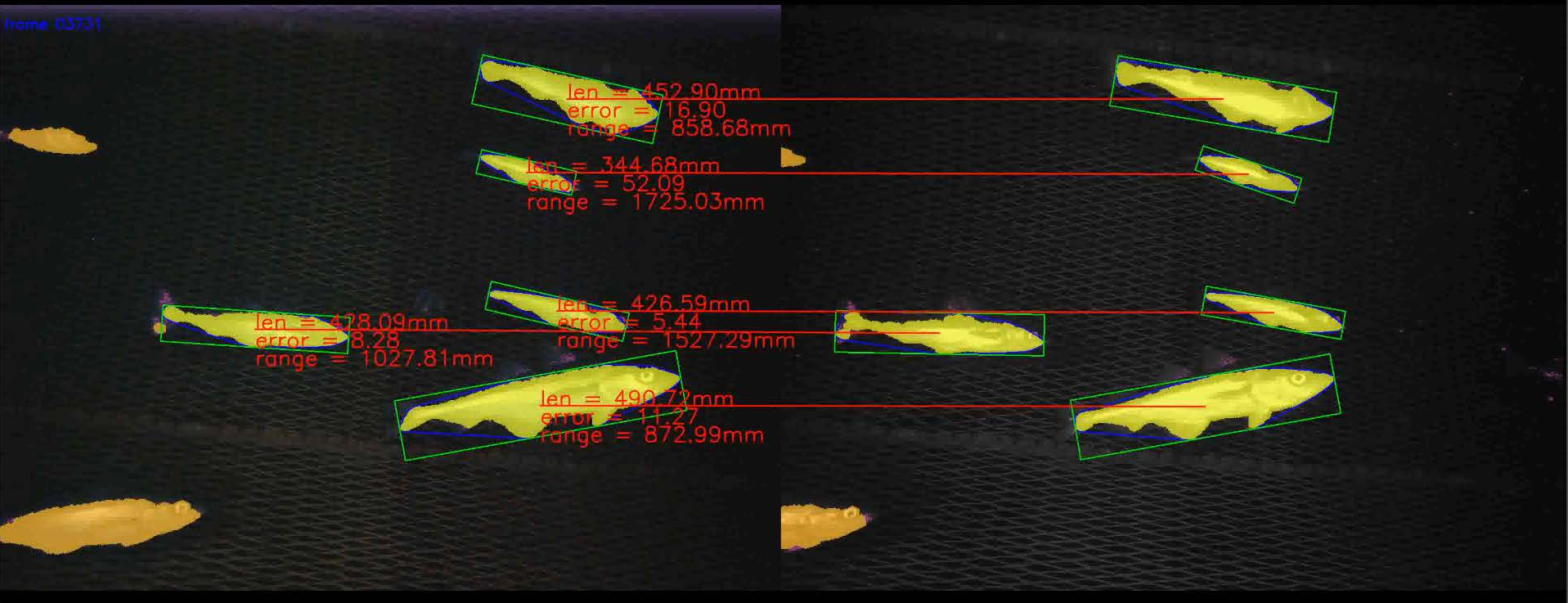
With –draw it takes significantly longer (it runs at 0.81 Hz and takes over a minute to complete), but will output images like the one at the top of this readme as well as a CSV file.
Note that the KWIVER C++ Sprokit pipline offers a significant speedup (4Hz vs 2.5Hz), although it currently does not have the ability to output the algorithm visualization.
Calibration Pipelines
VIAME provides several calibration pipelines for computing camera parameters from
images or video of a calibration target. The pipelines first attempt to detect a
checkerboard (chessboard) pattern, and if that fails, fall back to detecting a grid
of bright dots (circle grid). Detected corners or centers are accumulated across
frames and used to solve for the camera intrinsics, distortion coefficients, and
(for stereo) extrinsic parameters. The square_size parameter must be set to the
real-world size of a checkerboard square (or dot spacing) in your chosen unit (e.g.,
millimeters) – this value determines the scale of all subsequent measurements. When
running from the DIVE interface, the pipeline will prompt for the checkerboard square
size in real units before running. The output calibration file can then be used by the
measurement pipelines.
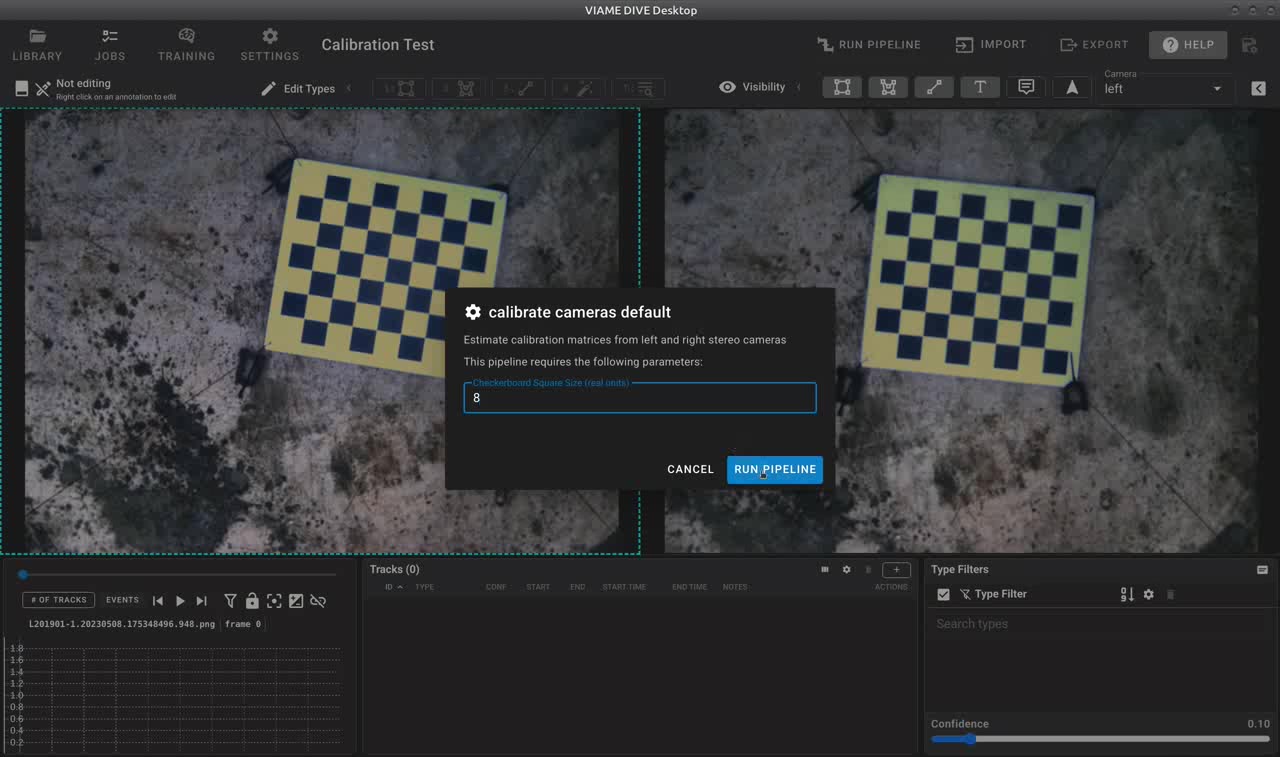
The DIVE calibration dialog prompts for the checkerboard square size before running the calibration pipeline.
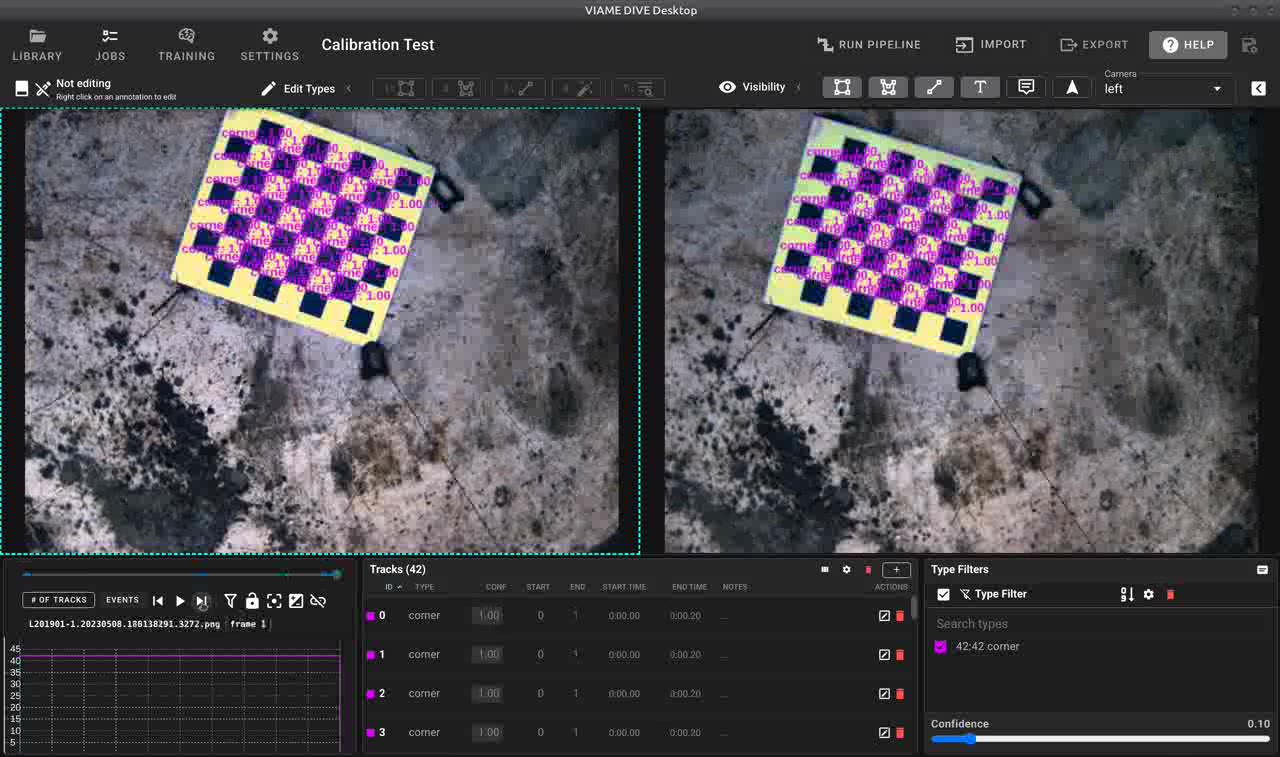
Successful stereo calibration showing detected feature correspondences between left and right camera views.
- measurement_calibrate_cameras_default.pipe
Stereo camera calibration from separate left and right camera inputs. Detects chessboard corners in both views, accumulates correspondences across frames, and computes stereo calibration matrices. Outputs
calibration_matrices.json. This is the recommended pipeline for most stereo calibration tasks.- measurement_calibrate_cameras_fast.pipe
A faster variant of the stereo calibration pipeline that uses fewer frames (threshold of 25 vs. the default). Use this when you have a large number of calibration frames and want quicker results at the cost of slightly reduced accuracy.
- utility_calibrate_single_camera.pipe
Monocular (single camera) calibration from images of a chessboard target. Computes intrinsic parameters and distortion coefficients for a single camera. Outputs
calibration.json. Useful when you only need to undistort imagery from one camera or as a preliminary step before stereo calibration.- utility_calibrate_stitched_stereo_pair.pipe
Calibrates a stereo pair from a single video or image input where left and right frames are horizontally concatenated (stitched side-by-side). The pipeline splits each frame, detects chessboard corners in both halves, and computes stereo calibration. Outputs
calibration_matrices.json. Useful for cameras that record both views into a single file.
To run a calibration pipeline from the command line, for example:
source /path/to/VIAME/install/setup_viame.sh
kwiver runner configs/pipelines/utility_calibrate_single_camera.pipe \
  -s downsampler:input_file_name=calibration_images.txt \
  -s global:square_size=25.0
For stereo calibration with separate camera inputs:
kwiver runner configs/pipelines/measurement_calibrate_cameras_default.pipe \
  -s input1:video_filename=cam1_images.txt \
  -s input2:video_filename=cam2_images.txt \
  -s global:square_size=25.0
Stereo Disparity and Depth Pipelines
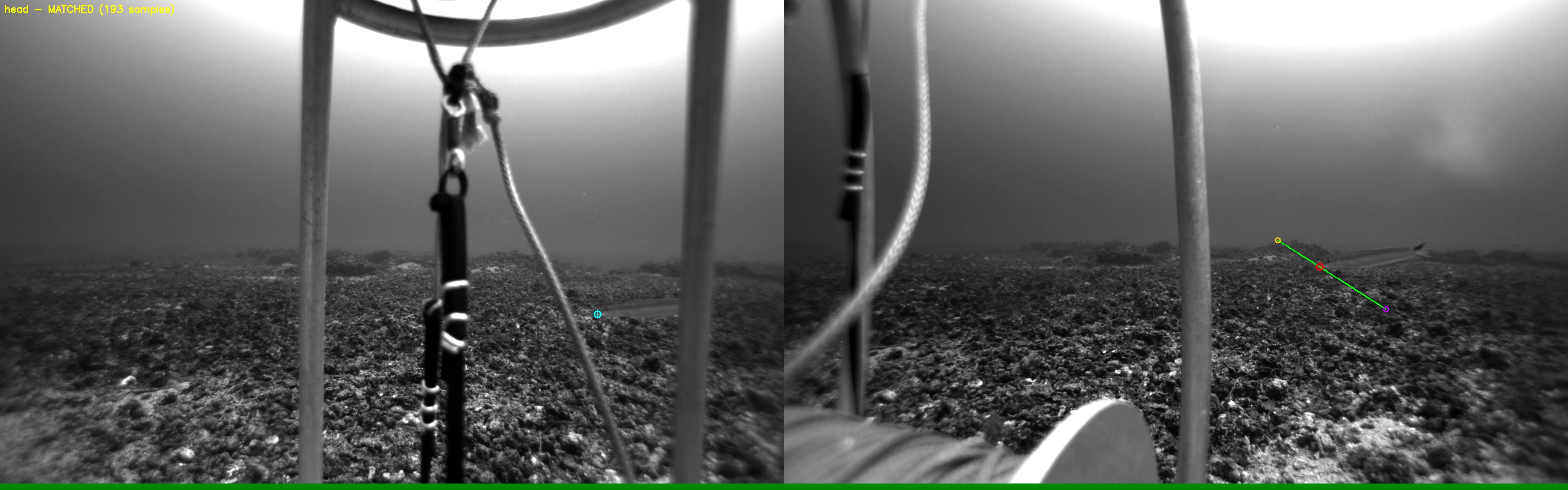
Stereo epipolar matching: a point selected in the left camera (cyan) is matched to its correspondence in the right camera (green/red) using epipolar geometry.
VIAME includes several methods for computing stereo disparity and depth maps, which
are used internally by the measurement pipelines and can also be run standalone for
visualization or custom processing. Stereo measurement requires a calibration file
containing the camera intrinsic and extrinsic parameters. This calibration file can
either be computed within VIAME using one of the calibration pipelines described above,
or imported from an external source (e.g., OpenCV, MATLAB Camera Calibrator, or other
third-party calibration tools). Supported calibration file formats include JSON (as
output by the VIAME calibration pipelines), NPZ (numpy archive), MAT (MATLAB), and
.CamCAL (SEAGIS) files. See the Calibration File Format section below for
details on the expected contents of each format.
- measurement_compute_rectified_disparity.pipe
Computes rectified stereo disparity maps using the SGBM (Semi-Global Block Matching) algorithm with WLS filtering. Requires a pre-computed camera calibration file. Useful for visualizing depth or feeding into custom measurement workflows.
- filter_stereo_depth_map.pipe
Filters and enhances stereo depth maps from horizontally concatenated stereo images. Applies CLAHE contrast enhancement and denoising before computing OCV stereo disparity. Outputs filtered depth map images.
- Foundation Stereo (add-on)
The Foundation Stereo add-on provides a deep learning-based stereo disparity model that produces higher quality depth estimates than traditional SGBM. It is available in three model sizes:
vits(small, faster),vitb(base), andvitl(large, more accurate). The small variant is recommended for most use cases. Foundation Stereo is used by themeasurement_from_annotations_fdn_stereo_s.pipepipeline and can be enabled by installing the Foundation Stereo add-on.
Measurement from Annotations Pipelines
These pipelines compute stereo measurements from user-provided annotations (e.g., head/tail keypoints on fish). They read left and right camera track files, match detections between cameras, and triangulate 3D positions to compute lengths.
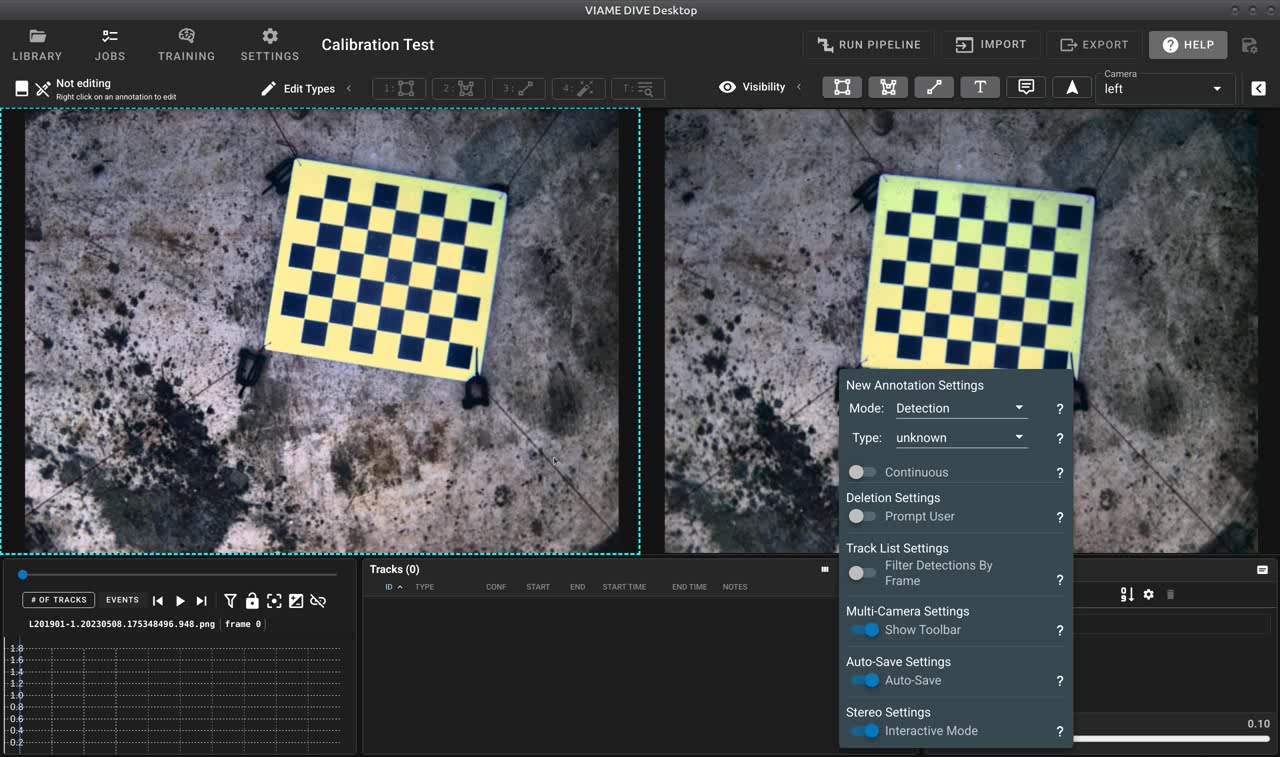
Setting up interactive stereo measurement in DIVE with multi-camera settings.
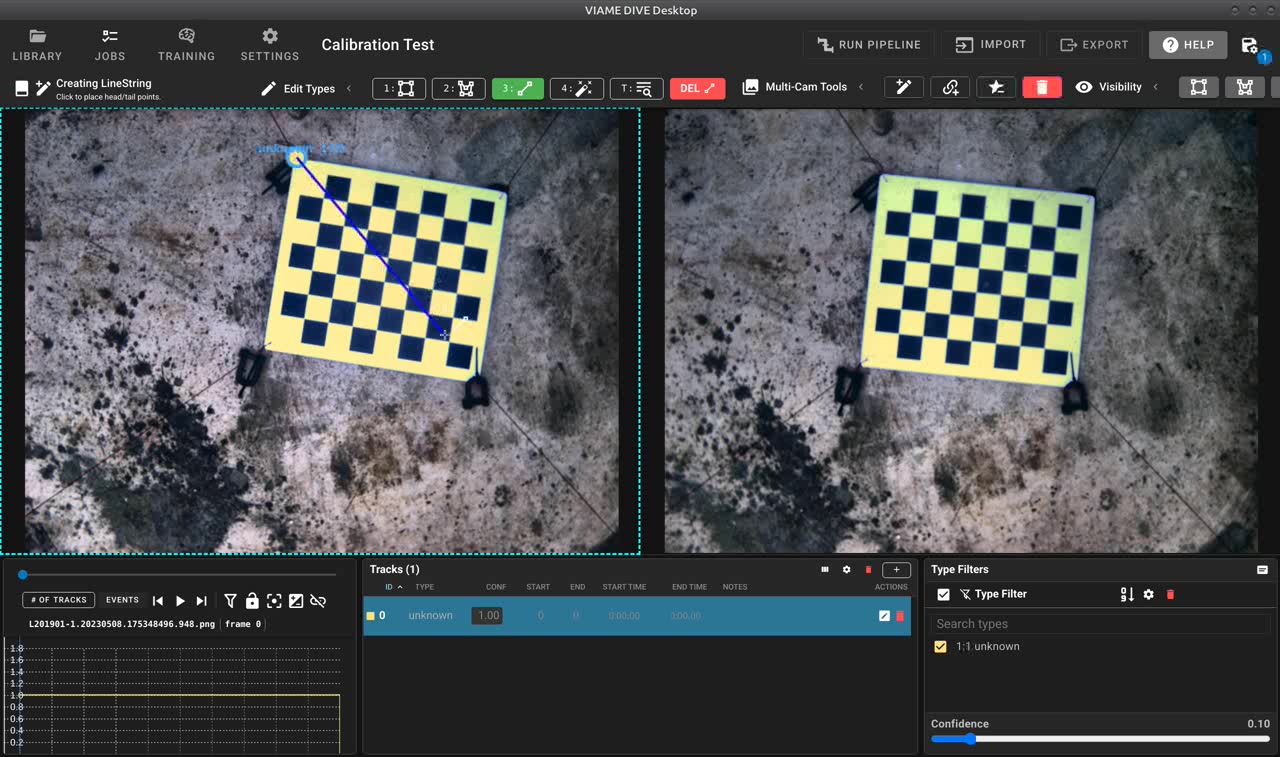
Creating stereo annotations interactively – the user draws on one camera view.
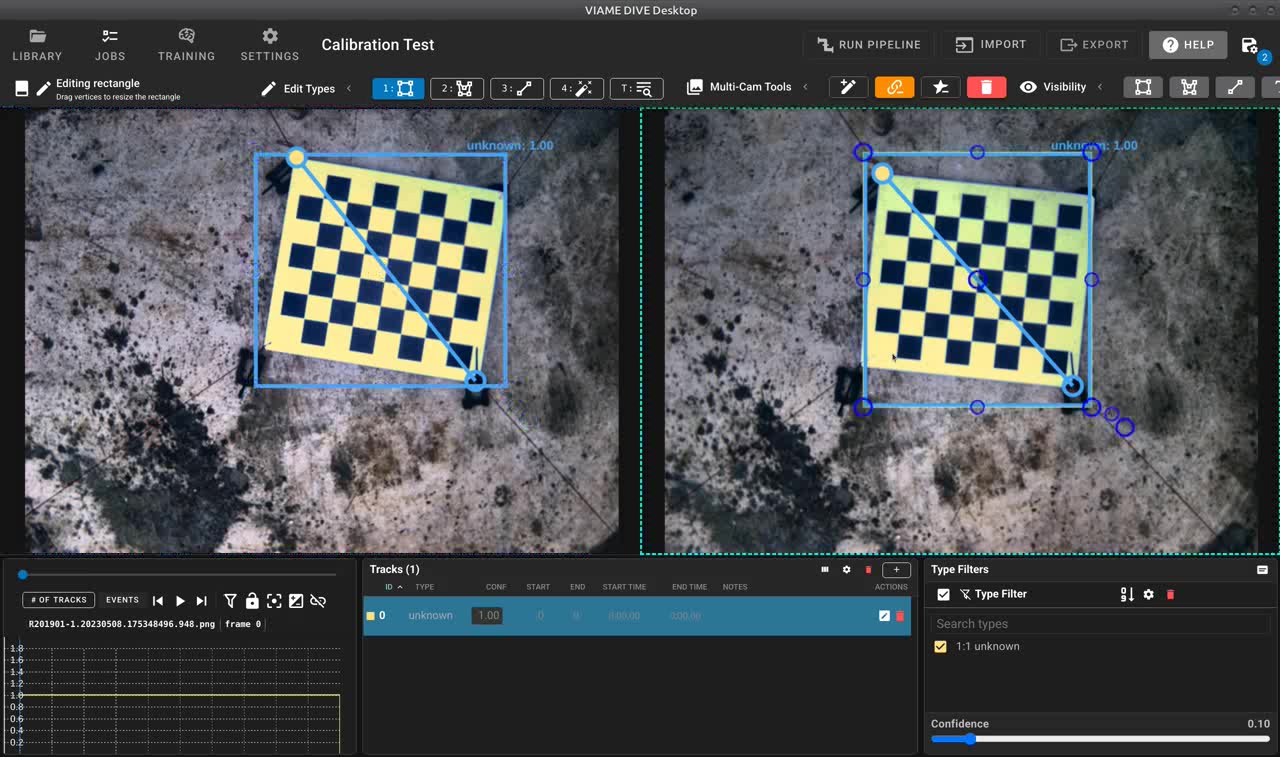
Stereo correspondences with epipolar geometry shown across left and right views.
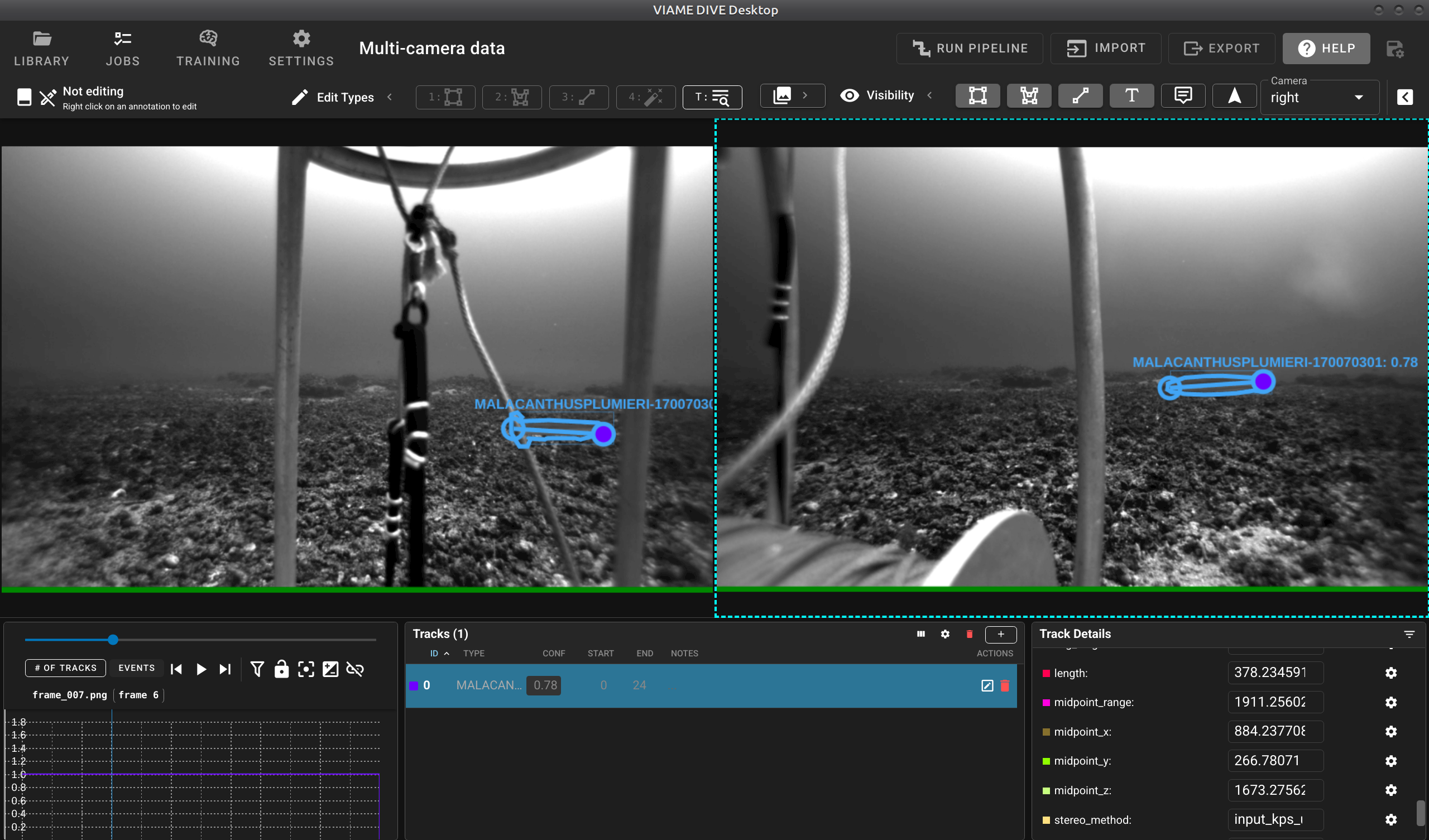
Stereo measurement results in DIVE showing detected objects with computed lengths displayed in the Track Details panel.
- measurement_from_annotations_default.pipe
The default measurement-from-annotations pipeline. Uses Foundation Stereo (if the add-on is installed) for disparity estimation and ORB feature matching for stereo correspondence. Reads annotation files for both cameras, pairs detections, and outputs measured tracks to
computed_tracks2.csv.- measurement_from_annotations_fdn_stereo_s.pipe (Foundation Stereo add-on)
Uses the Foundation Stereo deep learning model (small variant) for high-quality disparity estimation. Recommended when the Foundation Stereo add-on is installed, as it generally produces more accurate measurements than traditional methods.
- measurement_from_annotations_ncc_dino.pipe (DINO add-on)
Uses DINO visual features for template matching between left and right camera views, with NCC (Normalized Cross-Correlation) as a secondary matching stage. Can produce better correspondence in challenging cases where ORB features are insufficient.
- measurement_from_annotations_seagis.pipe (SEAGIS add-on)
Uses the SEAGIS StereoLibLX library with
.CamCALcalibration files for stereo measurement. Supports epipolar template matching as a fallback when only one camera has annotated keypoints. Use this pipeline if your calibration data is in the SEAGIS format.
Fully Automatic Measurement Pipelines
These pipelines perform end-to-end automatic detection and measurement without requiring any manual annotations.
- measurement_fully_auto_fish_default.pipe
Fully automatic fish detection and measurement pipeline. Uses a neural network fish detector with windowed processing on both stereo cameras, then performs stereo matching and triangulation to compute fish lengths. Outputs measured tracks to
computed_tracks2.csv.- measurement_fully_auto_gmm_motion.pipe
Automatic measurement pipeline using GMM (Gaussian Mixture Model) background subtraction to detect moving objects. Computes oriented bounding boxes for measurement. Best suited for stationary camera setups where fish swim through the field of view.
Calibration File Format
For the npz file format the root object should be a python dict with the following keys and values:
For the mat file, format the root structure should be a dict with the key Cal whose value is a dict with the following items: