Image Enhancement and Filtering
This document corresponds to the Image Enhancement example folder within a VIAME desktop installation. This directory stores assorted scripts for debayering, color correction, illumination normalization, and general image contrast enhancement.
Build Requirements
These are the build flags required to run this example, if building from the source.
In the pre-built binaries they are all enabled by default.
Running the Examples
Three example scripts are provided, each demonstrating a different enhancement workflow.
On Linux, run the .sh scripts; on Windows, run the corresponding .bat files.
enhance – Applies CLAHE, auto white balance, and saturation boost to standard RGB images. Run via:
./enhance.sh
Uses the filter_enhance.pipe pipeline. Input images are listed in
input_list_rgb_images.txt.
debayer_and_enhance – First debayers raw Bayer-pattern sensor images (e.g. from an AUV camera), then applies the same enhancement pipeline. Run via:
./debayer_and_enhance.sh
Uses the filter_debayer_and_enhance.pipe pipeline. Input images are listed in
input_list_raw_images.txt.
normalize_16bit – Normalizes 16-bit or floating-point imagery (e.g. thermal or scientific sensors) to standard 8-bit using percentile-based stretching. Run via:
./normalize_16bit.sh
Uses the filter_normalize_16bit.pipe pipeline. Input images are listed in
input_list_16bit_images.txt.
Running Filters via DIVE Desktop
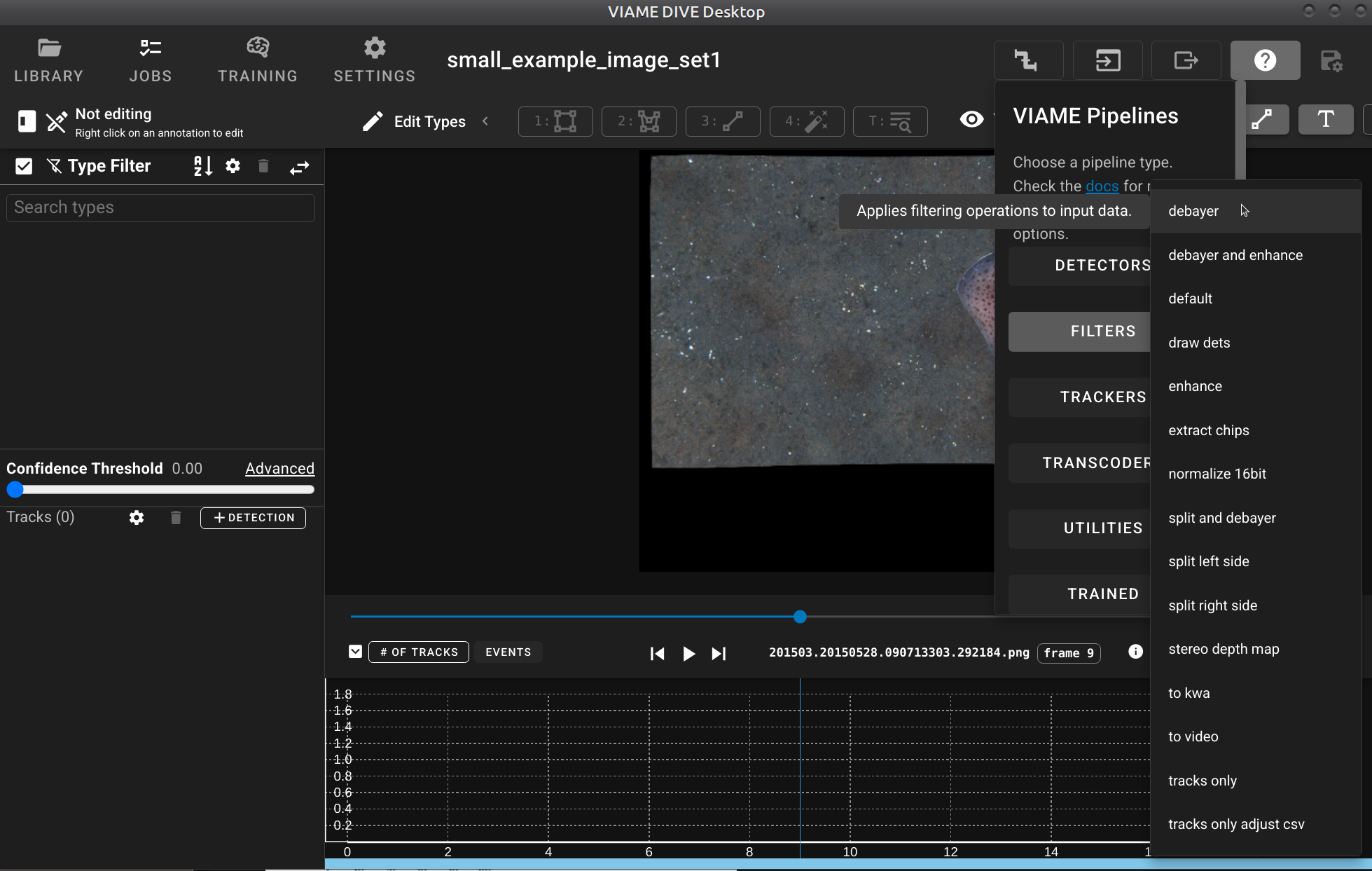
All of the filter and transcode pipelines described in this document can also be run through the DIVE Desktop interface (currently desktop only, not the web version). To run a filter pipeline from DIVE Desktop:
Open your image set or video in DIVE Desktop.
Click the VIAME Pipelines button in the upper-right corner.
Select the FILTERS or TRANSCODER category from the pipeline type list.
Choose the desired pipeline (e.g.
enhance,debayer and enhance,normalize 16bit,stereo depth map,draw dets,extract chips, etc.).The pipeline will run on the loaded data, and the filtered output will be written to the project output directory.
This provides a convenient way to apply enhancement, debayering, format conversion, and other filtering operations without needing to use the command line.
Image Enhancement Algorithms
VIAME provides several image filter algorithms that can be used independently or
chained together in pipelines. All filters implement the image_filter algorithm
interface and are configured via :filter:type in pipeline files.
ocv_enhancer – General-Purpose Enhancement
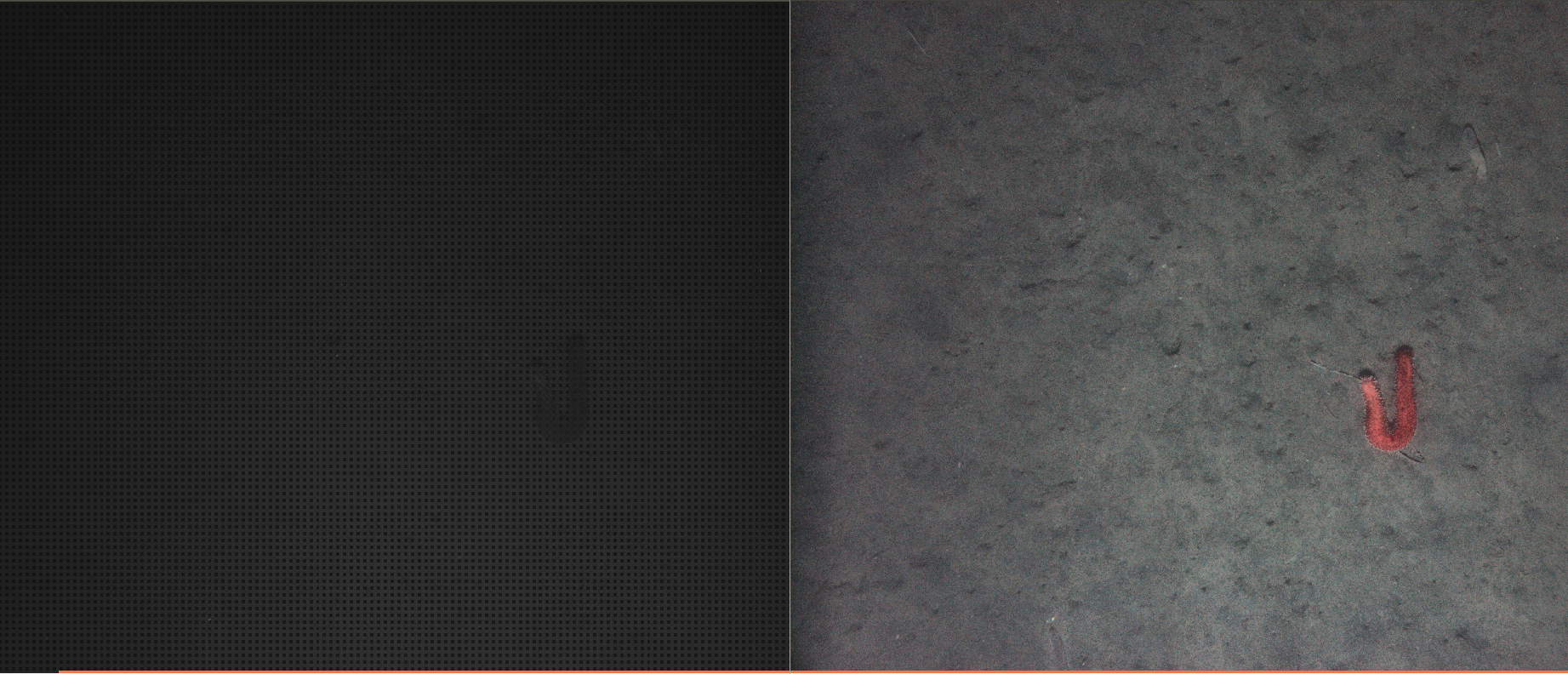
Plugin: ocv_enhancer (plugins/opencv/enhance_images.cxx)
A multi-stage image enhancement filter using Lab color space and CLAHE. Processing stages are applied in the following order, with each stage independently enabled:
Smoothing – Median blur to reduce salt-and-pepper noise.
apply_smoothing(bool, default: false) – Enable/disable.smoothing_kernel(unsigned, default: 3) – Kernel size (must be odd).Denoising – Fast Non-Local Means denoising for 8-bit color images. Reduces Gaussian noise while preserving edges. If the input is not 8-bit, denoising is deferred until after
force_8bitconversion.apply_denoising(bool, default: false) – Enable/disable.denoise_kernel(unsigned, default: 3) – Patch size for NLM.denoise_coeff(unsigned, default: 3) – Filter strength (h parameter).Auto White Balance – Gray-world assumption: scales each RGB channel so that the per-channel means are equalized.
auto_balance(bool, default: false) – Enable/disable.Force 8-bit – Converts non-8-bit imagery (16-bit, float) to 8-bit via min-max normalization.
force_8bit(bool, default: false) – Enable/disable.CLAHE – Contrast Limited Adaptive Histogram Equalization applied to the L channel in Lab color space. Improves local contrast without amplifying noise beyond the clip limit.
apply_clahe(bool, default: false) – Enable/disable.clip_limit(unsigned, default: 4) – Clip limit for histogram bins. Typical values: 1-3 for standard enhancement, 10-20 for depth maps.Saturation – Scales the saturation channel in HSV color space. Values greater than 1.0 boost color vibrancy.
saturation(float, default: 1.0) – Scale factor (e.g. 1.20 = 20% boost).Sharpening – Unsharp masking via weighted subtraction of a Gaussian-blurred copy from the original.
apply_sharpening(bool, default: false) – Enable/disable.sharpening_kernel(unsigned, default: 3) – Gaussian blur sigma.sharpening_weight(double, default: 0.5) – Blend weight [0.0, 1.0].
Example pipeline configuration:
process filter
  :: image_filter
  :filter:type                                 ocv_enhancer
  :filter:ocv_enhancer:apply_clahe             true
  :filter:ocv_enhancer:clip_limit              3
  :filter:ocv_enhancer:auto_balance            true
  :filter:ocv_enhancer:saturation              1.20
ocv_debayer – Bayer Pattern Demosaicing
Plugin: ocv_debayer (plugins/opencv/debayer_filter.cxx)
Converts raw Bayer-pattern CFA (Color Filter Array) sensor data to RGB or grayscale images using OpenCV’s demosaicing algorithms.
pattern (string, default: BG) – Bayer pattern of the sensor. One of:
BG, GB, RG, GR.force_8bit (bool, default: false) – Convert output to 8-bit after debayering.Example pipeline configuration:
process debayer
  :: image_filter
  :filter:type                                 ocv_debayer
  :filter:ocv_debayer:pattern                  BG
  :filter:ocv_debayer:force_8bit               true
ocv_color_correction – Color Correction
Plugin: ocv_color_correction (plugins/opencv/apply_color_correction.cxx)
Advanced color correction algorithms designed especially for underwater imagery. Multiple correction stages can be combined. Processing order: gamma correction, gray world white balance, then underwater compensation.
Gamma Correction:
apply_gamma (bool, default: false) – Enable gamma correction.gamma (double, default: 1.0) – Gamma value. Less than 1.0 brightens, greater
than 1.0 darkens.gamma_auto (bool, default: false) – Automatically estimate optimal gamma from
image histogram to target a mean brightness of middle gray.Gray World White Balance:
apply_gray_world (bool, default: false) – Enable gray world algorithm. Scales
RGB channels to equalize means, excluding saturated pixels.gray_world_sat_threshold (double, default: 0.95) – Pixels brighter than this
fraction of max are excluded from the mean calculation.Underwater Correction:
apply_underwater (bool, default: false) – Enable underwater color compensation.underwater_method (string, default: “simple”) – Correction method:simple – Depth-based attenuation compensation with optional backscatter removal.fusion – Multi-exposure fusion combining white balance, CLAHE, and gamma
correction for more robust results.depth_map_path (string, default: “”) – Path to a precomputed depth map image.use_auto_depth (bool, default: true) – Estimate relative depth from the
blue/red channel ratio when no depth map is provided.water_type (string, default: “oceanic”) – Preset attenuation coefficients:oceanic – R=0.5, G=0.3, B=0.1 (clear open ocean).coastal – R=0.6, G=0.4, B=0.2 (nearshore, moderate turbidity).turbid – R=0.7, G=0.5, B=0.3 (murky, high particulate).red_attenuation (double, default: 0.5) – Red channel attenuation [0-1].green_attenuation (double, default: 0.3) – Green channel attenuation [0-1].blue_attenuation (double, default: 0.1) – Blue channel attenuation [0-1].backscatter_removal (bool, default: true) – Remove backscatter (underwater haze)
using morphological erosion to estimate and subtract the scattered light component.Example pipeline configuration:
process color_correct
  :: image_filter
  :filter:type                                 ocv_color_correction
  :filter:ocv_color_correction:apply_gamma     true
  :filter:ocv_color_correction:gamma_auto      true
  :filter:ocv_color_correction:apply_underwater true
  :filter:ocv_color_correction:underwater_method fusion
  :filter:ocv_color_correction:water_type      coastal
percentile_norm – Percentile Normalization
Plugin: percentile_norm (plugins/core/normalize_image_percentile.cxx)
Normalizes image intensity values using percentile-based min/max calculation. Useful for converting 16-bit or floating-point sensor data (thermal, sonar, etc.) to 8-bit for visualization or use with models that expect standard 8-bit input. The formula is:
output = (input - p_low) / (p_high - p_low) * max_value
lower_percentile (double, default: 1.0) – Lower percentile for min value.upper_percentile (double, default: 100.0) – Upper percentile for max value.
Using 99.0 clips the top 1% of values, reducing the effect of bright outliers.output_format (string, default: “8-bit”) – Output format: 8-bit (always
output 0-255) or native (same type as input, stretched to full range).Example pipeline configuration:
process filter
  :: image_filter
  :filter:type                                 percentile_norm

  block filter:percentile_norm
    :lower_percentile                          1.0
    :upper_percentile                          99.0
    :output_format                             8-bit
  endblock
Additional Filters
The following filters are also available:
ocv_convert_color – Converts images between color spaces (RGB, BGR, XYZ, YCrCb, HSV, HLS, Lab, Luv, grayscale).
ocv_random_hue_shift – Applies random hue, saturation, and intensity shifts for data augmentation during training. Configurable trigger probability and shift ranges.
vxl_enhancer – VXL-based image enhancement with smoothing, automatic white balancing (with spatial and temporal correction matrices), and illumination normalization. Supports 8-bit, 16-bit, and floating-point imagery. Requires VIAME_ENABLE_VXL.
ocv_horizontally (split_image) – Splits a single image horizontally into left and right halves. Used for stereo camera pairs (e.g. HabCam).
Pre-Built Filter Pipelines (filter_*)
These pipelines read images from a file list, apply filtering operations, and write
the processed images to disk. They are located in configs/pipelines/ and are run
via the KWIVER pipeline_runner tool or via the DIVE Desktop FILTERS menu.
- filter_default
Reads images and associated tracks (VIAME CSV), downsamples to 5 fps, and writes both images and tracks to disk. No image enhancement is applied. Useful as a template for custom pipelines or for frame extraction.
- filter_enhance
Applies the
ocv_enhancerfilter with CLAHE (clip_limit=3), auto white balance, and a 1.20x saturation boost. Outputs enhanced PNG images. This is the standard enhancement pipeline for pre-captured RGB imagery.- filter_debayer
Debayers raw Bayer-pattern images (BG pattern) and converts to 8-bit RGB. No additional enhancement is applied. Use this when you only need demosaicing without color correction.
- filter_debayer_and_enhance
Chains debayering (BG pattern, 8-bit) followed by full enhancement (CLAHE, auto balance, saturation boost). The standard pipeline for processing raw camera data from underwater survey systems.
- filter_normalize_16bit
Applies percentile-based normalization (1st-99th percentile) to convert 16-bit or floating-point imagery to 8-bit PNG. Designed for thermal cameras, sonar, and other non-standard sensors.
- filter_split_and_debayer
Splits a horizontally-concatenated stereo image pair, debayers the left image (BG pattern), and applies full enhancement. Useful for stereo camera systems that store both views in a single image file.
- filter_split_left_side
Extracts only the left half of a horizontally-concatenated stereo image pair. No debayering or enhancement is applied.
- filter_split_right_side
Extracts only the right half of a horizontally-concatenated stereo image pair. No debayering or enhancement is applied.
- filter_stereo_depth_map
Splits a stereo image pair, computes a disparity/depth map using the OpenCV SGBM (Semi-Global Block Matching) algorithm, and applies CLAHE with a high clip limit (20) to enhance the depth visualization. Outputs depth map PNG images.
- filter_debayer_and_depth_map
Full stereo processing pipeline: debayers raw Bayer images, applies initial enhancement, splits into stereo halves, computes a depth map via SGBM (min_disparity=64, num_disparities=192, block_size=15), and outputs both the debayered/enhanced images and depth maps.
- filter_draw_dets
Reads detections from a VIAME CSV file and draws bounding boxes on the corresponding images using the OpenCV drawing algorithm. Outputs annotated JPEG images. Useful for visualizing detection or annotation results.
- filter_extract_chips
Reads detections from a VIAME CSV file and extracts image chips (cropped regions) around each detected object. Outputs individual chip PNG files with a naming pattern that encodes the source frame and bounding box coordinates.
- filter_to_video
Converts an image sequence to an MP4 video file using FFmpeg. No enhancement is applied. Frame rate and timestamps are preserved from the input.
- filter_to_kwa
Applies enhancement (CLAHE with clip_limit=2, auto balance) and writes the result to KW Archive (KWA) format with metadata for GSD and corner points. Used for integration with KW-based video analysis tools.
- filter_tracks_only
Reads images and both detection and track files, downsamples to 5 fps, filters detections by confidence threshold, and outputs only the frames that contain detections. Frame indices are renumbered in the output CSV to match the extracted image sequence.
- filter_tracks_only_adjust_csv
Similar to
filter_tracks_onlybut also outputs adjusted detection CSV files alongside the track CSV, with frame indices renumbered to match the extracted images.
Pre-Built Transcode Pipelines (transcode_*)
These pipelines read images or video and produce MP4 video output. They are designed
for converting between formats, optionally applying enhancement or annotation
overlays. Located in configs/pipelines/.
- transcode_default
Reads images with associated tracks, applies
force_8bitconversion (no other enhancement), downsamples to 5 fps, and outputs an MP4 video and track CSV file. The baseline transcoding pipeline.- transcode_enhance
Applies full enhancement (CLAHE with clip_limit=3, auto balance, 1.20x saturation boost, force_8bit) and writes to MP4 video. Produces the highest quality enhanced video output.
- transcode_compress
Minimal enhancement (force_8bit only) with high-compression FFmpeg settings (CRF=30). Optimized for reducing file size when visual quality is less critical.
- transcode_draw_dets
Reads detections from a VIAME CSV file, draws bounding boxes on each frame, and writes the annotated result to MP4 video. The video equivalent of
filter_draw_dets.- transcode_tracks_only
Reads images and tracks, downsamples to 5 fps, filters to include only frames with detections, applies
force_8bitconversion, and outputs the filtered video and track CSV.- transcode_native_fps
Reads video at native frame rate (no downsampling). Resamples existing tracks from a downsampled rate (default 5 fps) to the native rate via bounding box interpolation. Outputs full-rate video and resampled track CSV. Useful for producing final visualization videos at the original capture frame rate.
Code Used in Example
Core image enhancement source files:
Pipeline configuration files: