Object Tracking Examples
Overview
This document corresponds to the object tracking example folder within a VIAME desktop installation. Object tracking attempts to identify the same object across sequential frames in either video or image sequences. VIAME contains two broad categories of trackers:
Automatic multi-target trackers – link object detections across frames automatically
User-initialized trackers – track user-selected objects from a drawn box or point
Within each category, several algorithm implementations are available:
Automatic multi-target trackers:
SRNN (Structured RNN) – learned appearance + motion model based on LSTMs (typical default)
ByteTrack – IoU-based Kalman filter matching; lightweight, no GPU required
Stabilized IOU – homography-based image registration + IoU matching for moving cameras
SiamMask (MTT mode) – visual-similarity tracker auto-initialized from detections
User-initialized trackers (annotation-assist):
SiamMask (default) – fast Siamese network tracker initialized from a bounding box
SAM2 – Segment Anything Model 2, produces segmentation masks (requires add-on)
SAM3 – Segment Anything Model 3 with grounding DINO support (requires add-on)
Tracking can either be run from scripts, such as those contained within this example, or from one of the user interfaces within VIAME (e.g. DIVE, VIEW, SEAL). Several of the trackers above can be trained or tuned on domain-specific data – see the object tracker training examples for details. For trackers that link detections, the upstream detector can also be trained – see the object detector training examples.
In the DIVE interface, pipelines are organized into menu groups based on the first
word of the pipeline file name. Automatic multi-target trackers appear under the
Tracker menu (e.g. Tracker -> Generic Proposals for
tracker_generic_proposals.pipe). User-initialized trackers appear under the
Utilities menu (e.g. Utilities -> Track Selections Default Mask for
utility_track_selections_default_mask.pipe, Utilities -> Track Selections SAM2 for
utility_track_selections_sam2.pipe, etc.). In the VIEW interface, all pipelines
are available in the pipelines dropdown.
Automatic Multi-Target Trackers

Most multi-target trackers (MTT) link detections (produced by a separate detection algorithm) into tracks. Each detection on a given frame is either associated with an existing track or used to start a new one. For trackers that link detections, any of the detectors available in VIAME can be used upstream – see the object detection examples for details on the available detectors. Some MTT algorithms (such as SiamMask in multi-target mode) go further and generate their own detections on subsequent frames, only requiring detections for track initialization purposes. All MTT trackers expect a detection step upstream in the pipeline that produces per-frame detections.
Example CLI scripts in this folder for MTT trackers include:
run_generic_tracker– run the default multi-target tracker with generic proposalsrun_bytetrack_tracker– run the ByteTrack multi-target trackerrun_stabilized_iou_tracker– run homography-stabilized IOU tracker
The default multi-target tracker in a given VIAME release is configured in
common_default_tracker.pipe. This file can be modified to switch between any
of the available MTT algorithms described below. In most VIAME releases, the default
tracker is SRNN for the GPU-enabled version, and ByteTrack in the CPU version.
SRNN (Structured RNN)
The SRNN tracker is the typical default multi-target tracker in VIAME releases. It is a variant of the approach described in the “Tracking the Untrackable” paper [TUT17], where new detections are tested against existing tracks using a learned classifier. The classifier combines several LSTM networks that model:
A (Appearance) – Siamese network features for visual similarity
I (Interaction) – spatial relationships between concurrent objects
M (Motion) – kinematic patterns of each track
A Hungarian matrix algorithm is used on all track/detection combinations to make final linking decisions.
Sadeghian et al. “Tracking the untrackable: Learning to track multiple cues with long-term dependencies.” IEEE ICCV 2017.
Key properties:
Requires GPU (PyTorch)
Learns appearance and motion models specific to the target domain
Best suited for complex scenarios with many concurrent objects, frequent occlusions, and interacting targets
Needs substantial training data (100+ annotated tracks recommended)
An example SRNN tracker configuration:
process tracker
  :: track_objects
  :track_objects:type                          srnn

block track_objects:srnn
  :siamese_model_input_size                    224
  :detection_select_threshold                  0.001
  :similarity_threshold                        0.200
  :terminate_track_threshold                   10
  :IOU_tracker_flag                            True
  :IOU_accept_threshold                        0.500
  :IOU_reject_threshold                        0.100
  relativepath siamese_model_path =            models/siamese_model.pt
  relativepath targetRNN_AIM_model_path =      models/rnn_f_aim.pt
  relativepath targetRNN_AIM_V_model_path =    models/rnn_ml_aim.pt
endblock
SRNN trackers can be trained from groundtruth annotations using:
viame train -i /path/to/training/data -tt srnn
Note
The viame train tracker training option (-tt) is a new addition and is
currently in beta. It may change in future releases.
The training process involves multiple stages: data preparation, Siamese model training, feature extraction, individual LSTM training, and combined SRNN training.
ByteTrack
ByteTrack is a simple and effective tracking algorithm that uses a Kalman filter for motion prediction and IoU (Intersection over Union) for data association. It uses a two-stage matching strategy: high-confidence detections are matched first, then low-confidence detections fill remaining gaps.
Key properties:
No GPU required – runs entirely on CPU
No appearance model – relies only on bounding box overlap and motion
Well suited for roughly stationary cameras or cameras with mild motion
Configurable parameters include detection thresholds, IoU match threshold, and the number of frames to keep lost tracks alive (track buffer)
An example ByteTrack configuration:
process tracker
  :: track_objects
  :track_objects:type                          bytetrack

block track_objects:bytetrack
  :high_thresh                                 0.6
  :low_thresh                                  0.1
  :match_thresh                                0.8
  :track_buffer                                30
  :new_track_thresh                            0.6
endblock
ByteTrack parameters can be trained (optimized via Kalman filter tuning) from groundtruth annotations using:
viame train -i /path/to/training/data -tt bytetrack
Stabilized IOU Tracker
The stabilized IOU tracker combines frame-to-frame image registration (via feature extraction and homography estimation) with a simple IOU-based data association. By first estimating how the camera has moved between frames, detections can be mapped into a common (stabilized) coordinate system before matching.
Key properties:
Designed for moving cameras (aerial/drone imagery, benthic tow cameras, ROVs)
Uses SURF features + FLANN matching + homography estimation for stabilization
No deep learning required (runs on CPU)
Requires enough texture in the scene for feature matching
The stabilized IOU tracker is configured in common_stabilized_iou_tracker.pipe,
which includes common_image_stabilizer.pipe:
include common_image_stabilizer.pipe

process tracker
  :: simple_homog_tracker
  min_iou = 0.01

connect from stabilizer.homography_src_to_ref
        to   tracker.homography_src_to_ref
This tracker maps detections into a ground-plane coordinate system using the estimated homography, then links detections with sufficient IoU overlap. It is used in several domain-specific pipelines including sea lion tracking from aerial imagery and SEAMAP survey processing.
SiamMask (Multi-Target Mode)
SiamMask can also operate as a multi-target tracker when combined with a detector. In this mode, the tracker automatically initializes new tracks when detections exceed a confidence threshold. A basic IOU algorithm prevents duplicate tracks on the same object. Unlike the MTT trackers above, SiamMask actively maintains a visual template for each tracked object and updates it frame-to-frame.
Adaptive Tracker Training
VIAME also provides an adaptive tracker training mode that automatically analyzes the statistics of groundtruth tracking data and selects the best tracker(s) to train. The adaptive trainer considers track count, length, density, motion patterns, fragmentation, and occlusion levels to pick up to 3 trackers from: ByteTrack, OC-SORT, DeepSORT, BoT-SORT, and SRNN. Run with:
viame train -i /path/to/training/data -c train_tracker_adaptive.conf
User-Initialized Trackers
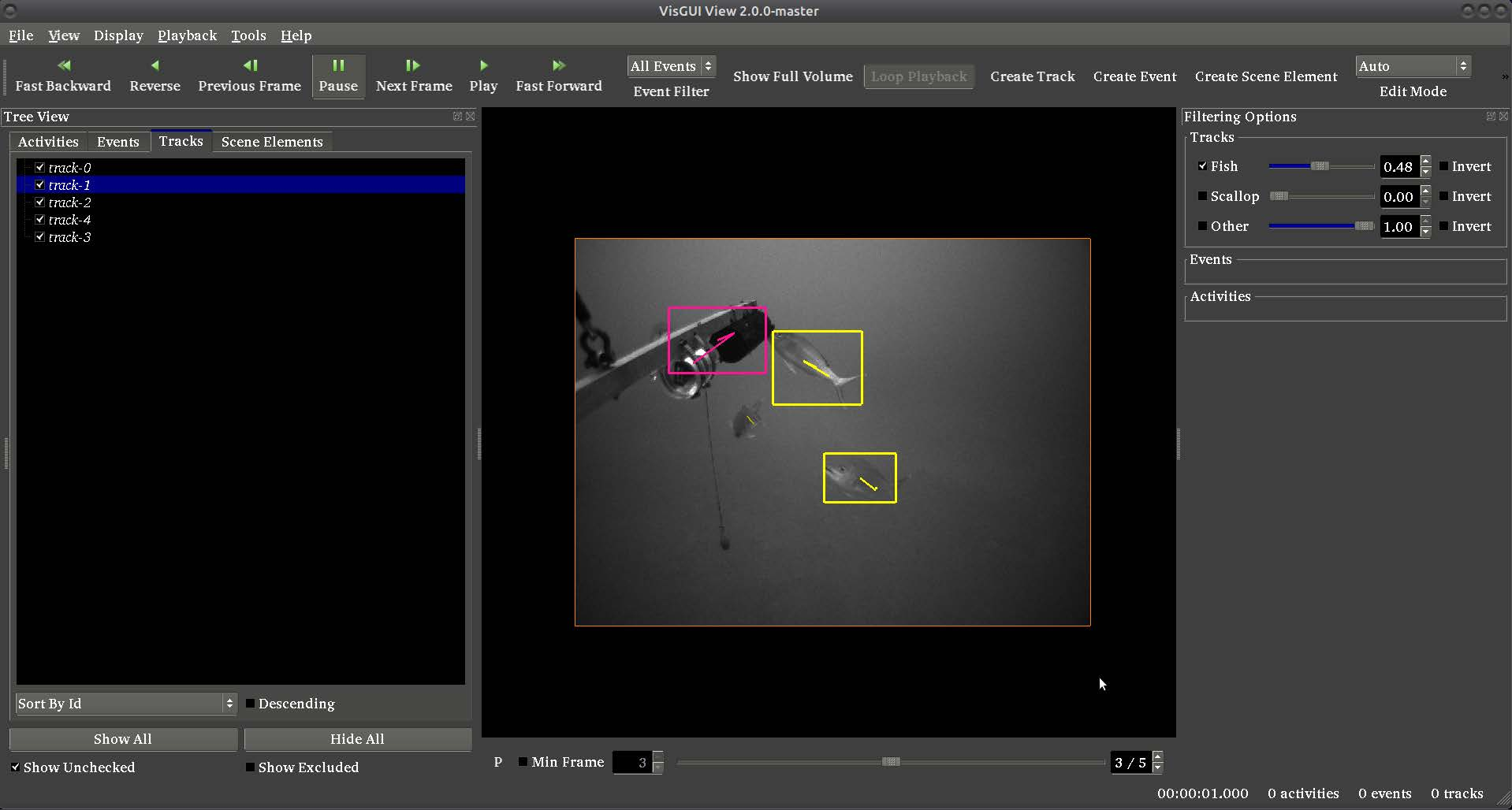
User-initialized trackers are designed for annotation-assist workflows. The user draws a bounding box (or places a point) on the first frame of an object, and the tracker propagates the annotation across subsequent frames. This is useful for rapidly generating track-level annotations without labeling every frame.
These pipelines can track multiple targets simultaneously if multiple boxes or points are drawn. The pipelines will create new tracks only for single-state detections (i.e., annotations on a single frame). Any existing multi-frame tracks in the input are passed through unmodified and will not be re-tracked.
Example CLI scripts in this folder for user-initialized trackers include:
run_user_init_tracker– run SiamMask tracker (default)run_sam2_tracker– run SAM2 tracker (requires SAM2 add-on)run_sam3_tracker– run SAM3 tracker (requires SAM3 add-on)bulk_run_user_init_tracking– batch process multiple sequences
SiamMask
SiamMask is the default user-initialized tracker. It is a variant of the SiamRPN++ algorithm [SiamRPN] combined with mask prediction from [SiamMask].
Hu et al. “SiamMask: A framework for fast online object tracking and segmentation.” IEEE PAMI 2023.
Li et al. “SiamRPN++: Evolution of siamese visual tracking with very deep networks.” IEEE CVPR 2019.
Key properties:
Initialized from a bounding box drawn by the user
Produces both bounding boxes and segmentation masks
Runs on GPU (PyTorch)
Included in the base VIAME installation (no add-on required)
Fast – suitable for interactive annotation workflows
Uses a confidence threshold to decide when to stop tracking (target lost)
The SiamMask tracker pipeline is utility_track_selections_default_mask.pipe:
process short_term_tracker
  :: siammask_tracker

  relativepath config_file =                   models/pysot_default_siammask.yaml
  relativepath model_file =                    models/pysot_default_siammask.pth
  :threshold                                   0.80
SiamMask can be re-trained for specific domains:
viame train -i /path/to/training/data -tt siammask
SAM2 (Segment Anything Model 2)
SAM2 provides high-quality segmentation masks and supports video object tracking with temporal memory. It can be initialized from a bounding box or point.
Note
SAM2 requires the sam2 add-on package to be installed. Install it via the VIAME add-on manager or by placing model files in the appropriate directory.
Key properties:
Initialized from a bounding box or point drawn by the user
Produces high-quality segmentation polygon masks
Uses temporal memory for consistent tracking across frames
Runs on GPU (CUDA required)
Supports configurable output types: polygon, mask, or both
Includes quality filtering and polygon simplification
The SAM2 tracker pipeline is utility_track_selections_sam2.pipe:
process track_refiner
  :: refine_tracks
  :refiner:type                                sam2

  block refiner:sam2
    :cfg                                       configs/sam2.1/sam2.1_hiera_b+.yaml
    :device                                    cuda
    :overwrite_existing                        true
    :output_type                               polygon
    :polygon_simplification                    0.01
    :min_mask_area                             10
    :filter_by_quality                         true
    relativepath checkpoint =                  models/sam2_hbp.pt
  endblock
SAM3 (Segment Anything Model 3)
SAM3 extends SAM2 with grounding DINO-based text queries for object detection and segmentation. It can find objects by text description in addition to box/point initialization.
Note
SAM3 requires the sam3 add-on package to be installed. Install it via the VIAME add-on manager or by placing model files in the appropriate directory.
Key properties:
Initialized from a bounding box, point, or text query
Uses Grounding DINO for text-guided object detection
Produces high-quality segmentation polygon masks with temporal tracking
Runs on GPU (CUDA required)
Can optionally detect and add new objects automatically (
add_new_objects)Supports memory-based training for temporal consistency
The SAM3 tracker pipeline is utility_track_selections_sam3.pipe:
process track_refiner
  :: refine_tracks
  :refiner:type                                sam3

  block refiner:sam3
    :grounding_model_id                        IDEA-Research/grounding-dino-tiny
    :device                                    cuda
    :text_query                                object
    :detection_threshold                       0.3
    :text_threshold                            0.25
    :output_type                               polygon
    :polygon_simplification                    0.01
    :min_mask_area                             10
    relativepath sam_model_id =                models/sam3_weights.pt
    relativepath model_config =                models/sam3_config.json
  endblock
SAM3 trackers can be fine-tuned for specific domains:
viame train -i /path/to/training/data -tt sam3
Comparison of User-Initialized Trackers
Feature |
SiamMask |
SAM2 |
SAM3 |
|---|---|---|---|
Initialization |
Box |
Box or Point |
Box, Point, Text |
Output |
Box + Mask |
Polygon Mask |
Polygon Mask |
Add-on Required |
No |
Yes (sam2) |
Yes (sam3) |
GPU Required |
Yes |
Yes (CUDA) |
Yes (CUDA) |
Speed |
Fast |
Moderate |
Moderate |
Mask Quality |
Good |
High |
High |
Text Queries |
No |
No |
Yes |
Trainable |
Yes |
No |
Yes |
Registration-Based Trackers
Registration-based trackers use frame-to-frame image registrations to identify the same locations in corresponding frames. These mapped locations are then used to link the same objects in some world (aka ground) plane. In the context of VIAME, these trackers are currently used for two purposes: tracking objects on the ground in aerial imagery, or tracking objects on the ground in fast-moving benthic camera systems pointed at the sea floor.
The image stabilizer uses feature detection (SURF), feature matching (FLANN), and
homography estimation to compute the geometric transformation between consecutive
frames. This is configured in common_image_stabilizer.pipe. The resulting
homography is consumed by the simple_homog_tracker process which maps detections
into a stabilized coordinate system for IOU-based matching.
There are a number of pieces of code used in the approach, including:
packages/kwiver/python/kwiver/sprokit/processes/multicam_homog_tracker.py
configs/add-ons/sea-lion/tracker_(multiple).pipe
configs/pipelines/common_stabilized_iou_tracker.pipe
configs/pipelines/common_image_stabilizer.pipe
Example Scripts
Automatic Multi-Target Tracking
run_generic_tracker.sh/.batRuns a generic object proposal detector followed by the default automatic multi-target tracker. Uses the
tracker_generic_proposals.pipepipeline.run_bytetrack_tracker.shRuns the ByteTrack automatic multi-target tracker with generic proposals. Demonstrates how to override tracker parameters from the command line.
run_stabilized_iou_tracker.shRuns the homography-stabilized IOU tracker for moving camera scenarios. Uses
common_stabilized_iou_tracker.pipewith feature-based image stabilization.
User-Initialized Tracking
run_user_init_tracker.sh/.batRuns SiamMask user-initialized tracker on user-drawn detections. Uses
utility_track_selections_default_mask.pipe.run_sam2_tracker.shRuns SAM2 user-initialized tracker on user-drawn detections. Uses
utility_track_selections_sam2.pipe. Requires the sam2 add-on.run_sam3_tracker.shRuns SAM3 user-initialized tracker on user-drawn detections. Uses
utility_track_selections_sam3.pipe. Requires the sam3 add-on.
Batch Processing
bulk_run_user_init_tracking.sh/.batBatch-processes multiple sequences using the
process_video.pyscript with user-initialized tracking. Reads groundtruth annotations as initializations.